The Holiday Craft Fair is fast approaching, and I need some new stock! I have several ideas for some pendants and bracelets, but I am looking to learn some new finishing techniques. Hence the tutorial I have chosen for this round: the Faux Ceramic look found on Polymer Clay Web, here.
The look that is achieved with this is so pretty and delicate. I am a real fan! I envision using my own textures with this technique. We will see how that goes...
If you want your version posted along with mine and/or if you want to be added to the email list to be sent reminders, please email me (and a small caption with the photo of your project if you so desire) no later than Friday October 22nd at 6:00pm PST.
Pages
Finding my way through polymer clay!
I am a polymer clay artist on the coast of California. I am inspired by the shapes and colors of nature, especially the beauty you find in or near the ocean.
Wednesday, September 29, 2010
Thursday, September 23, 2010
Results!! Maggie Maggio's Split Ring Chains
I haven't been feeling to terribly creative lately, so this was the perfect project. I didn't even need to mix colors as I had a palette leftover and sitting in a baggie doing nothing that I decided to use.
The tutorial is perfectly done. And the addition of the worksheet is simply brilliant! No need for a ruler or anything.
I made 1 of each size rings just so I could see how each turned out (the are the red ones you can barely see in the image below), but then did all the rest in the medium size. I took the time to make striped skinner blends and use them on a mud core... but of course I made the stripes too small and it all ended up being rolled and I lost the effect entirely =( You can't even tell in these pics! When I realized that happened, I just mushed my remaining clay and did a simple twist.
And here they are made into quite the bulky bracelet.
My impressions of this technique: it's really cool. The rings are a little springier then what I was expecting, though. Maybe if I baked longer or used a harder clay like Kato (I use Premo) they would feel sturdier. They are not my style, but I am really glad that I learned how to do it, as I can forsee using one of these split rings as an element in a design, just not the entirety of the design.
And finally, we need more tutorials like this one! Maggie Maggio has done a great thing by providing this free tutorial. I do have her book too and it's fantastic!
Stay tuned for the next tutorial post! I am trying to do my monthly PCGOE challenge just now, so it may be a few days before I put up my next post.
Until then...
The tutorial is perfectly done. And the addition of the worksheet is simply brilliant! No need for a ruler or anything.
I made 1 of each size rings just so I could see how each turned out (the are the red ones you can barely see in the image below), but then did all the rest in the medium size. I took the time to make striped skinner blends and use them on a mud core... but of course I made the stripes too small and it all ended up being rolled and I lost the effect entirely =( You can't even tell in these pics! When I realized that happened, I just mushed my remaining clay and did a simple twist.
And here they are made into quite the bulky bracelet.
My impressions of this technique: it's really cool. The rings are a little springier then what I was expecting, though. Maybe if I baked longer or used a harder clay like Kato (I use Premo) they would feel sturdier. They are not my style, but I am really glad that I learned how to do it, as I can forsee using one of these split rings as an element in a design, just not the entirety of the design.
And finally, we need more tutorials like this one! Maggie Maggio has done a great thing by providing this free tutorial. I do have her book too and it's fantastic!
Stay tuned for the next tutorial post! I am trying to do my monthly PCGOE challenge just now, so it may be a few days before I put up my next post.
Until then...
Friday, September 3, 2010
Maggie Maggio's Split Ring Chains - Due Monday September 20
This project just came through my reader today and I am in LOOOOOOOVE. How fun are these split rings! It seems like you can make so many things with them. And how lucky are we that not only is there a VIDEO tutorial, but a downloadable worksheet that Maggie is supplying to her readers?
The tutorial and the spreadsheet are both available on Maggie's blog, here.
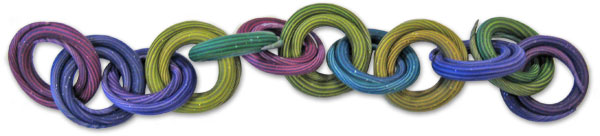
Here is a picture of the finished project as posted on Polymer Clay Daily which is where I saw the project in the first place.
This should be a lot of fun and I look forward to seeing what everyone does with this.
If you want your version posted along with mine and/or if you want to be added to the email list to be sent reminders, please email me (and a small caption with the photo of your project if you so desire) no later than Monday September 20th at 6:00pm PST.
The tutorial and the spreadsheet are both available on Maggie's blog, here.
Here is a picture of the finished project as posted on Polymer Clay Daily which is where I saw the project in the first place.
This should be a lot of fun and I look forward to seeing what everyone does with this.
If you want your version posted along with mine and/or if you want to be added to the email list to be sent reminders, please email me (and a small caption with the photo of your project if you so desire) no later than Monday September 20th at 6:00pm PST.
Wednesday, September 1, 2010
PCAGOE September Challenge Voting - win beatiful prizes!
I entered my piece from the "Donna Kato Transfers" craft-a-long in the September Challenge for the Polymer Clay Artists Guild of Etsy, which I recently joined.
I want to encourage my readers to go and vote! The coolest part, YOU the voters get entered into a pool to win prizes, just for casting your vote! Look at the pool of prize items, made by other PCAGOE members:
Pretty neat, huh?
Please go now and visit http://www.pcagoechallenge.blogspot.com/ and cast your vote. You can also read about the rules of the challenge, and have a closer look at the prize pool. As you will see, my entry is down at the bottom, #20!
Thanks!
I want to encourage my readers to go and vote! The coolest part, YOU the voters get entered into a pool to win prizes, just for casting your vote! Look at the pool of prize items, made by other PCAGOE members:
Pretty neat, huh?
Please go now and visit http://www.pcagoechallenge.blogspot.com/ and cast your vote. You can also read about the rules of the challenge, and have a closer look at the prize pool. As you will see, my entry is down at the bottom, #20!
Thanks!
Results: Image Transfers by Donna Kato
Well, image transfers are really fun, and I can see how they can be used to really spruce up items, or can be used as the jumping off point for a larger design, which is what I did.
I ended up using 4 different tutorials I found on the web, and 1 tutorial that was given to me as part of the PCAGOE Challenge. I did a combination of all of the different ways to do transfers. I ended up ruining a LOT of clay. I think I did about 20 transfers before my frustration level went through the roof and I just "settled" on the one I used, which thankfully also was the best of the bunch as it turns out.
One big lesson I learned... don't make a bunch of transfers and then leave it overnight. It becomes a sticky ugly mess!
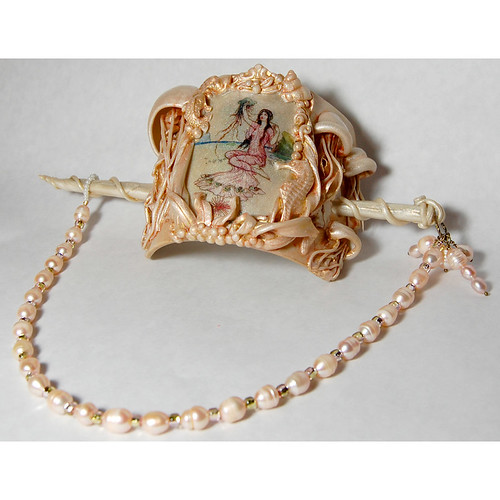
Here is my final piece:
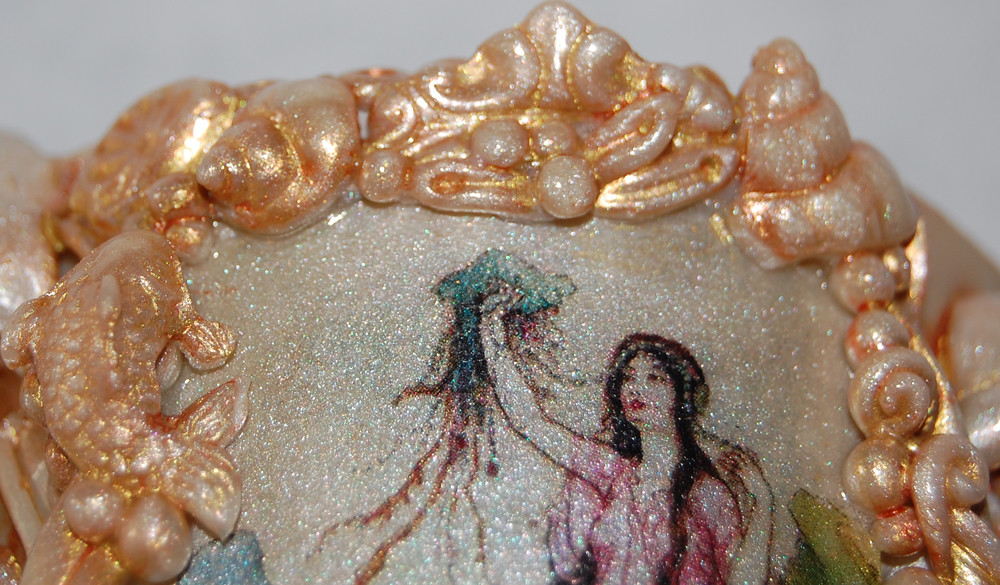
And, here is a close up of the details on the transfer itself:
When you look at the full size all the way blown up, you can see I get each dot of ink. I seriously took ages sloooowly and gently getting the paper off of this transfer. And I HATE pruny fingers so this was really a labor of love.
Sadly, once again I was alone on the craft-along. Come on people! This is good times!
Now, as I mentioned, I chose this tutorial craft along to work in conjunction with a challenge I was entering as part of the September Challenge at PCAGOE. I will be making another post shortly with more details, but if you just can't wait, go here to vote! I bet #20 looks familiar...
I ended up using 4 different tutorials I found on the web, and 1 tutorial that was given to me as part of the PCAGOE Challenge. I did a combination of all of the different ways to do transfers. I ended up ruining a LOT of clay. I think I did about 20 transfers before my frustration level went through the roof and I just "settled" on the one I used, which thankfully also was the best of the bunch as it turns out.
One big lesson I learned... don't make a bunch of transfers and then leave it overnight. It becomes a sticky ugly mess!
Here is my final piece:
And, here is a close up of the details on the transfer itself:
When you look at the full size all the way blown up, you can see I get each dot of ink. I seriously took ages sloooowly and gently getting the paper off of this transfer. And I HATE pruny fingers so this was really a labor of love.
Sadly, once again I was alone on the craft-along. Come on people! This is good times!
Now, as I mentioned, I chose this tutorial craft along to work in conjunction with a challenge I was entering as part of the September Challenge at PCAGOE. I will be making another post shortly with more details, but if you just can't wait, go here to vote! I bet #20 looks familiar...
Friday, August 20, 2010
Image Transfers by Donna Kato - Due Monday August 30
Hi Everyone!
For this tutorial craft along, I wanted to double up with a challenge I am doing for the Polymer Clay Artists Guild of Etsy of which I am the newest member. Since I am learning new techniques for this month's challenge (image transfers) you can learn with me!
I have found a great tutorial on how to do the image transfer technique on Craftedu put out by none other than the famous Donna Kato! Watch the tutorial here: http://craftedu.com/free-basic-laser-toner-image-transfers-on-polymer-clay/play-MzA0NDcxNjM3NQ
There are lots of image transfer tutorials out there, both on YouTube and on craft websites and blogs. They all give the same basic directions.
Have fun!
If you want your version posted along with mine, please email me your photo (and a small caption if you so desire) no later than Monday August 30th at 6:00pm PST. I'll update a post with results on Tuesday the 31st!
For this tutorial craft along, I wanted to double up with a challenge I am doing for the Polymer Clay Artists Guild of Etsy of which I am the newest member. Since I am learning new techniques for this month's challenge (image transfers) you can learn with me!
I have found a great tutorial on how to do the image transfer technique on Craftedu put out by none other than the famous Donna Kato! Watch the tutorial here: http://craftedu.com/free-basic-laser-toner-image-transfers-on-polymer-clay/play-MzA0NDcxNjM3NQ
There are lots of image transfer tutorials out there, both on YouTube and on craft websites and blogs. They all give the same basic directions.
Have fun!
If you want your version posted along with mine, please email me your photo (and a small caption if you so desire) no later than Monday August 30th at 6:00pm PST. I'll update a post with results on Tuesday the 31st!
Wednesday, August 18, 2010
Results: Ponsawan Sila's Texture Plate & Bubble Beads
Well folks, I gave it a good shot. And I gotta say, I found this series quite frustrating. And I wasted a ton of clay. It was a seemingly simple concept, but there are little tricks and things that must be obvious to the author of the tutorial which were not at all obvious to me. The first set of texture plates I made I guess I didn't make deep enough because the resulting "bubbles" didn't come out too hot:
I also failed to follow the directions on the thickness to make the clay sheet layers which probably added to the fail. Nothing to brag about, right? So I made a second bubble texture plate with deeper impressions and tried again. It came out only marginally better.
Another problem with this tut was the part where we had to "carefully slice off the bubbles one by one". But with the bubbles so close together, I found I would end up slicing adjacent ones thereby screwing them up. I think this is the point where I gave up, at least mentally. I bullied through though as I wouldn't be a very good hostess if I didn't complete my own projects, right?
I opted to make a cuff bracelet instead of a bead for the end product. I wanted the knobby texture, which I thought looked neato for a bangle so I didn't slice of the bubbles low and I didn't flatten out the sheet when I was done slicing as they appear on the original tut.
I actually like the bangle. However, the size of my wrist is not conducive to a cuff, and I didn't realize that the heat of your arm would make the cuff flexible while you wore it (Donna Kato has a great tutorial about adding wire armature to cuffs to avoid this bending issue -- which of course I found after I was done). So this cuff is headed for the bin!
I made a couple of other texture plates while I was at it. I don't know if I will use these ever, but that remains to be seen.
My biggest gripe, besides the problems with the execution, was that this same pattern / texture could have easily been made just doing a simple bulls-eye cane. I thought of this while in the midst of frustration. I sure wish I had realized it beforehand. Oh well.
Sadly nobody else did the tutorial this time around. I hope I have others for the next one!
I also failed to follow the directions on the thickness to make the clay sheet layers which probably added to the fail. Nothing to brag about, right? So I made a second bubble texture plate with deeper impressions and tried again. It came out only marginally better.
Another problem with this tut was the part where we had to "carefully slice off the bubbles one by one". But with the bubbles so close together, I found I would end up slicing adjacent ones thereby screwing them up. I think this is the point where I gave up, at least mentally. I bullied through though as I wouldn't be a very good hostess if I didn't complete my own projects, right?
I opted to make a cuff bracelet instead of a bead for the end product. I wanted the knobby texture, which I thought looked neato for a bangle so I didn't slice of the bubbles low and I didn't flatten out the sheet when I was done slicing as they appear on the original tut.
I actually like the bangle. However, the size of my wrist is not conducive to a cuff, and I didn't realize that the heat of your arm would make the cuff flexible while you wore it (Donna Kato has a great tutorial about adding wire armature to cuffs to avoid this bending issue -- which of course I found after I was done). So this cuff is headed for the bin!
I made a couple of other texture plates while I was at it. I don't know if I will use these ever, but that remains to be seen.
My biggest gripe, besides the problems with the execution, was that this same pattern / texture could have easily been made just doing a simple bulls-eye cane. I thought of this while in the midst of frustration. I sure wish I had realized it beforehand. Oh well.
Sadly nobody else did the tutorial this time around. I hope I have others for the next one!
Subscribe to:
Posts (Atom)